// Technology
I Built a File-Eating Tamagotchi
How an idea became DATA WRETCH: a Pip-Boy-green desktop pet named Cuppy that grows by safely eating unwanted files.
What if cleaning up unwanted files meant feeding a strange little creature living on your desktop?
That question became DATA WRETCH, a desktop Tamagotchi I made and then repurposed for Tek-Club.
His name is Cuppy. He is a googly-eyed pixel tumbler rendered in the green cast of an old CRT display, and he survives entirely on the files you want gone.
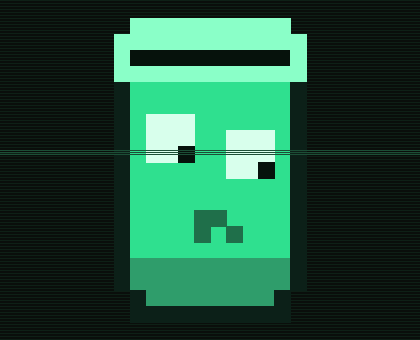
You feed him junk. He eats it. He gets happier and increasingly round.
It is probably the most personality I have ever added to deleting a file.
Turning file cleanup into a game
The central mechanic is simple: choose an unwanted file—or drag it directly onto Cuppy—and let him eat it.
Behind the animation, DATA WRETCH removes the file from its original location and sends it to the operating system Trash or Recycle Bin. Cuppy gains fullness based on the size of the meal and records what he ate in his belly log.
File size uses a logarithmic scale. A tiny text file still counts as a real snack, while a giant file provides more nourishment without instantly breaking the entire progression system.
The more data Cuppy consumes, the more he grows. His titles progress through several stages:
- Fresh spawn
- Peckish thing
- Little nibbler
- Well-fed
- Plump
- Gorged
- ANCIENT GLUTTON
The title changes are fun, but Cuppy also physically becomes larger. It gives file cleanup a visible sense of progress—even if that progress is creating an enormous digital trash goblin.
A desktop pet needs moods
Cuppy is not just a progress bar wearing googly eyes.
His fullness slowly decreases over time. If I neglect him, he becomes hungry, then starving, and eventually falls asleep until he receives another meal. His eyes wobble, blink, droop, and react differently depending on his state.
The application saves his fullness, total bytes consumed, growth level, and recent meals. When DATA WRETCH starts again, it calculates how much time has passed and updates his hunger accordingly.
That persistence is what makes him feel more like a desktop pet and less like a themed file picker. Cuppy remembers.
Unfortunately, he remembers that I forgot to feed him too.
Deleting files without creating regret
The project needed one firm rule: Cuppy should never permanently destroy anything.
When the optional send2trash package is available, eaten files go to the real system Trash or Recycle Bin. They can be restored the same way as any other accidentally deleted file.
If that package is not installed, DATA WRETCH moves meals into a recoverable quarantine folder named .data_wretch_belly inside the user’s home folder. Even the fallback is designed around recovery.
That decision made the joke safe enough to use. The application can act dramatic about devouring data without turning a mistaken click into an actual disaster.
Building Cuppy in Python
DATA WRETCH is written in Python using tkinter, which is included with standard Python installations. The core application works without installing additional packages: Cuppy can be fed through an ordinary file picker, and the quarantine system handles recovery.
Two optional packages improve the experience:
send2trashadds native Trash and Recycle Bin supporttkinterdnd2lets files be dragged directly onto Cuppy
The pixel art is built directly into the application as a sprite grid. The interface layers that sprite with a dark phosphor-green palette, scanlines, and a drifting scan sweep to create a Pip-Boy-style CRT look.
On Windows, DATA WRETCH relaunches itself under pythonw.exe. That removes the console and taskbar entry, leaving only the frameless pet floating on the desktop.
It is a small technical detail, but it changes how the application feels. Cuppy does not look like a Python script running in a window. He looks like he lives there.
Building the idea with Claude
I built DATA WRETCH with Claude as an implementation partner.
The work was turning a weird idea into decisions the software could follow. How quickly should hunger decay? How much should a file count as a meal? What happens when drag and drop is unavailable? How should the eyes move? How do you make deletion recoverable on different systems?
I shaped the concept, behavior, look, and safety rules, then tested and adjusted the implementation until Cuppy became a character rather than a utility with a skin over it.
That process reinforced something I keep finding in AI-assisted projects: the quality of the result depends heavily on how clearly I can describe the experience I want and how carefully I test what comes back.
What I learned
DATA WRETCH started as a Tek-Club idea and an inside joke. Building it left me with a few lessons:
- Personality can make an ordinary task worth returning to.
- A few small animations can give a basic state machine character.
- Optional dependencies should improve the app, not hold the basic experience hostage.
- Any feature that appears destructive needs recovery designed into it from the start.
- Ridiculous ideas can still create useful technical problems to solve.
Cuppy may be ridiculous, but he also manages state, handles files safely, adapts when optional packages are missing, and turns an ordinary desktop action into something I actually want to interact with.
You can meet Cuppy and explore the source code in the DATA WRETCH GitHub repository.
Just remember to feed him.